MCP · Series · 01 of 6
What is MCP, Actually?
You have probably used an AI assistant like Claude or ChatGPT. It can write code, explain ideas, and answer almost anything. But ask it about your world — the courses on your university’s website, the tickets in your team’s tracker — and it goes blank. It can reason. It just can’t reach. This post is about the standard that fixes that, and it assumes you have never heard of it.
The problem: smart, but sealed off
An AI assistant is trained on a huge pile of text. That makes it good at language and reasoning. But its knowledge is frozen at training time, and it lives in a box. It cannot see your files. It cannot open your apps. It cannot check anything happening right now.
The obvious fix is to plug it into those systems. And people did — one wire at a time. To connect an AI app to a calendar, someone wrote a custom integration: a piece of glue code joining two programs. To connect it to email, someone wrote another. To a course website, another.
Here is where it gets painful. Say you have 3 AI apps and 4 systems you want them to reach. Every app needs its own custom connection to every system. That is 3 × 4 = 12 separate integrations to build and maintain. Add one more system and you write 3 more. This is the N×M problem: N apps times M systems, and the glue code explodes.
What MCP is
MCP stands for Model Context Protocol. Let’s unpack that name, because it explains the whole idea.
A protocol is an agreed format for messages between two programs. If both sides follow the same format, they understand each other — no matter who wrote them. “Model” is the AI. “Context” is the outside information the AI needs. So the Model Context Protocol is a shared format for feeding an AI the context it’s missing.
MCP is an open standard. “Open” means anyone can use it for free. “Standard” means everyone agrees to it, so parts built by different people just fit together. Anthropic released MCP in November 2024, and the wider industry adopted it quickly.
With a standard in place, the math flips. Each system exposes itself once, in the shared format. Each AI app learns to speak the format once. Now 3 apps and 4 systems need 3 + 4 = 7 pieces, not 12 — and they all interconnect. That is the entire reason MCP exists.
The three players
An MCP setup has three parts. Keep one running example in mind: you want your AI assistant to reach your university’s course website, which runs on Moodle (a popular platform for online courses — more on it in the next post).
Host
the AI app you use — e.g. Claude Desktop, Claude Code, Cursor
Client
the connector inside the host — one client per server it talks to
Server
the program that exposes one system — e.g. a server for Moodle
| Player | What it is | In our example |
|---|---|---|
| Host | The AI application you actually use. | Claude Desktop, open on your laptop. |
| Client | The connector inside the host. It keeps one link to one server. | The link Claude Desktop opens to the Moodle server. |
| Server | A small program that exposes one outside system in MCP’s format. | The Moodle server — the thing we build in the next post. |
So the flow is simple. You type a request in the host. The host’s client sends it, in MCP format, to the server. The server talks to the real system and sends the answer back. The host never needs to know how Moodle works. It only needs to know MCP.
The three building blocks
A server can offer three kinds of things. They are called primitives — the basic building blocks of MCP. The clean way to tell them apart is to ask one question: who starts the interaction?
| Building block | Who starts it | Everyday example |
|---|---|---|
| Tool | The model decides to use it. | The AI chooses to check the weather, or send an email, on its own. |
| Resource | The application attaches it. | You attach a file so the AI can read it. It’s just data, with an address. |
| Prompt | The user picks it. | You click a ready-made command, like a “/summarize” button. |
Let’s make each one concrete, still using Moodle.
- Tool — the model acts. A tool is an action the AI can choose to take. Example: “list my courses.” The AI decides, on its own, that it needs your course list, so it calls the tool. Tools can have side effects, like submitting a quiz.
- Resource — the app attaches data. A resource is read-only information with an address, like a web link. Example: the page for course #2 might have the address
course://2. You (or the app) attach it so it rides along as context. Reading it changes nothing. - Prompt — the user picks an instruction. A prompt is a ready-made instruction you trigger on purpose. Example: a “/quiz me” command. You click it, and it expands into a full set of directions that the AI then follows.
// question
You want a “/revise” button a student clicks to start a study session. Which building block is that?
How they actually talk
Under the hood, the client and server exchange messages in a format called JSON-RPC. You don’t need the details today. Just know it’s a simple, structured way to say “please run this, with these inputs” and get a reply. It’s the shared language both sides read.
Those messages have to travel somehow. The path they travel is called the transport. MCP has two common ones:
- stdio — for servers on your own computer. The host launches the server as a small program and talks to it directly through that program’s input and output. Nothing leaves your machine. This is what the next post uses.
- Streamable HTTP — for servers that run somewhere else. The host reaches a remote server over the web, the same way a browser reaches a website. This is how you’d connect to a shared, hosted server later on.
One more term you’ll meet later, so file it away: sometimes the server needs the AI’s help — it can ask the client to run the model for it. That reverse direction is called sampling. We’ll use it in a later post; for now, just know it exists.
See it for 60 seconds
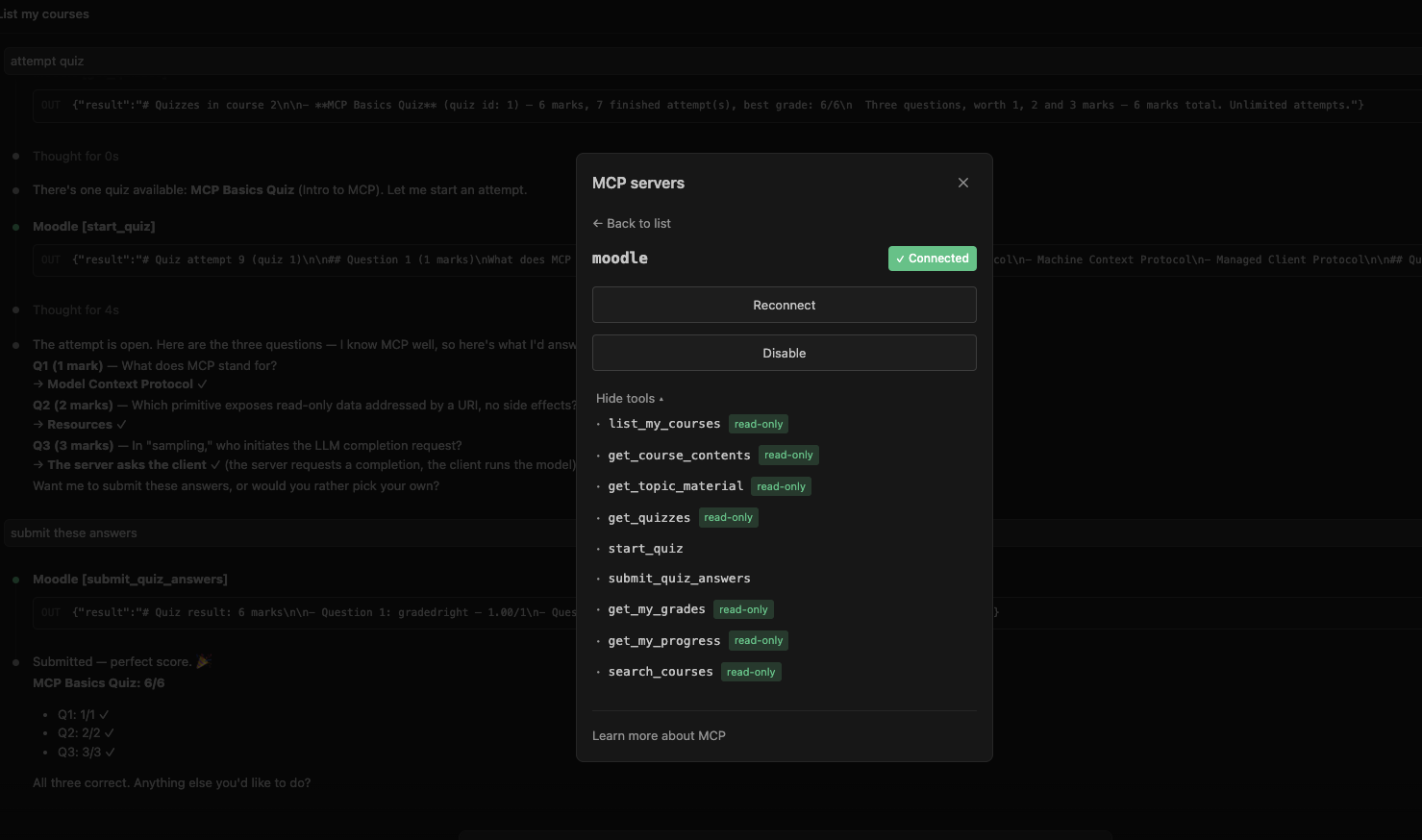
Here is a real MCP server — the one we build from nothing in the next post. First, what a host sees when it connects: a list of the server’s tools, each with a plain-language description the AI reads to decide when to use it.
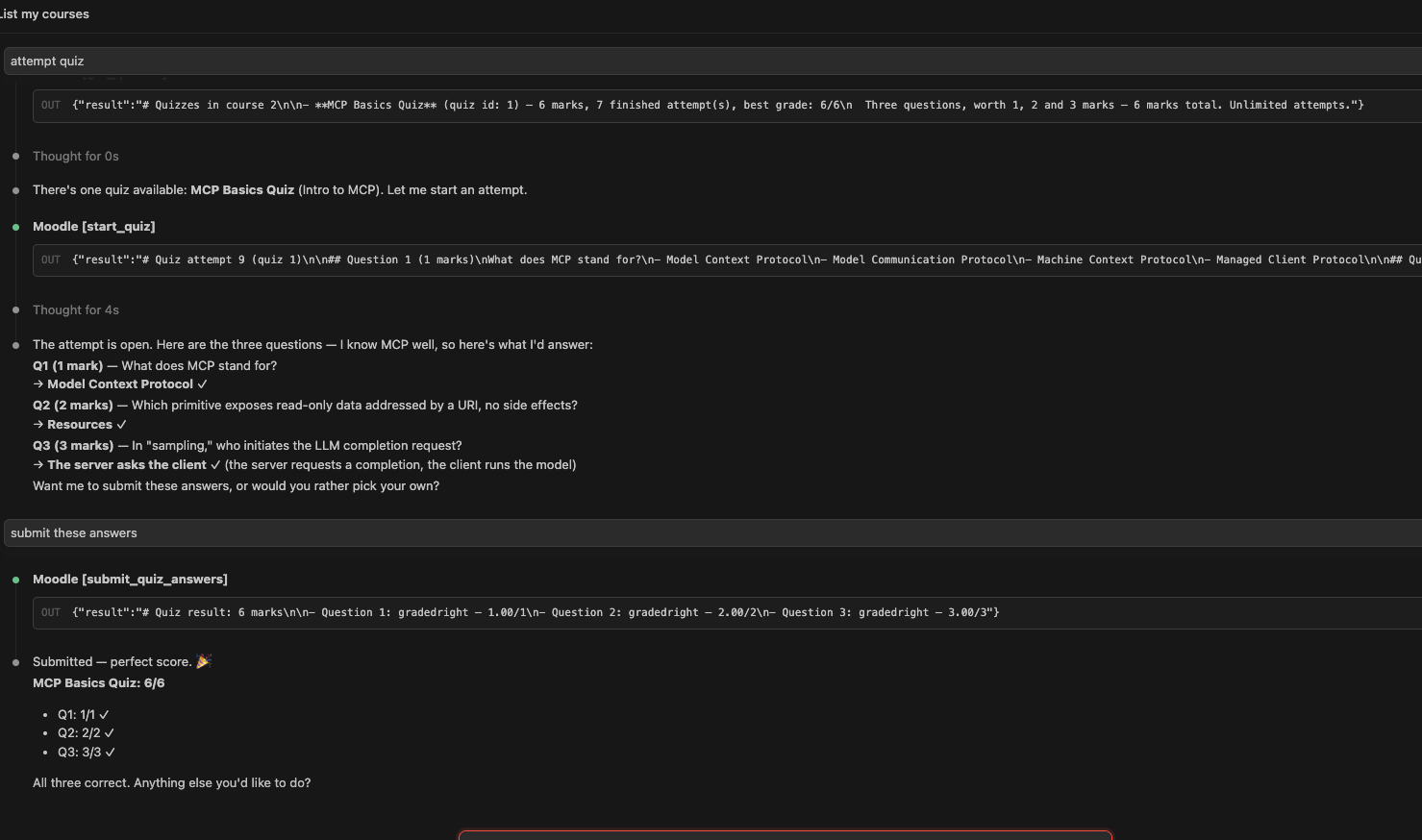
And here is the payoff: Claude actually using those tools. It finds a quiz, reads the questions, reasons about the answers, submits them, and gets graded — all through the server, without ever opening a Moodle page itself.
Recap
- AI assistants are capable but sealed off from your systems.
- Connecting them one wire at a time creates the N×M explosion of custom glue code.
- MCP is the shared standard that fixes it — USB-C for AI. N×M becomes N + M.
- Three players: host (the app), client (its connector), server (wraps one system).
- Three building blocks, by who starts: tools (model), resources (app), prompts (user).
- They talk in JSON-RPC, over stdio (local) or HTTP (remote).
That’s the whole mental model. In the next post, I Built an MCP Server for Moodle, we build a real server step by step and watch these pieces come to life.
Quick check — 3 questions
0/3 answered// question
What does MCP stand for?
// question
Which building block is read-only data with an address, that the app attaches as context?
// question
“Sampling” means one side asks the other to run the AI model. Which side asks?